
Stop Running AI Agents Like Chatbots
Chatbots answer once. Agents loop, call tools, retry, wait, spend money, and touch systems. That is a different workload.

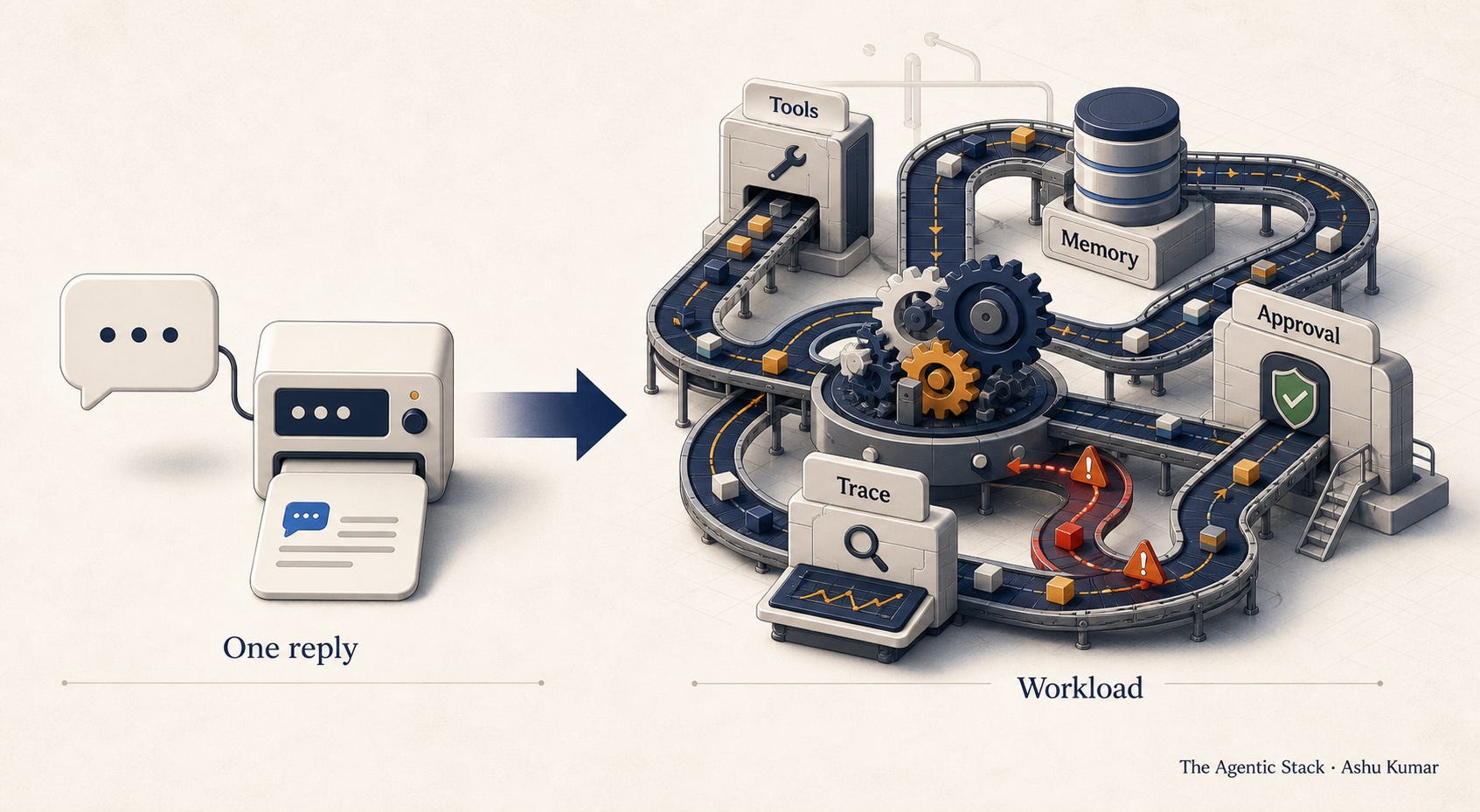
You built a chatbot.
Then someone asked it to do work.
That is where the architecture changed.
At first, the system looked simple. A user asked a question. The model answered. Maybe it searched a document. Maybe it summarized a policy. Maybe it drafted a response.
Request in.
Answer out.
That is the chatbot mental model.
It is clean. It is familiar. It fits nicely inside the product interface. It has latency, tokens, logs, and maybe a thumbs-up or thumbs-down button.
Then the business asks the obvious next question.
Can it also create the ticket?
Can it check the customer record?
Can it update the CRM?
Can it open the pull request?
Can it retry the failed deployment?
Can it notify the team?
Can it wait for approval and continue later?
That is the moment your chatbot becomes an agent.
And most teams keep running it like a chatbot.
That is the problem.
A Chatbot Is a Conversation. An Agent Is a Workload.
A chatbot answers.
An agent acts.
A chatbot returns text.
An agent touches systems.
A chatbot has a response.
An agent has a runtime.
A chatbot can be judged by the quality of the answer.
An agent has to be judged by the path it took to produce an outcome.
That distinction sounds small until you put it into production.
A chatbot might answer incorrectly.
An agent might answer correctly, call the wrong tool, write the wrong memory, spend too much, skip the right approval, and leave a downstream system in a state nobody expected.
The old mental model breaks because the unit of work changed.
The unit is no longer a message.
The unit is a run.
A run can contain retrieval, planning, tool calls, memory reads, memory writes, retries, waiting, escalation, human approval, cost accumulation, and downstream side effects.
That is not a chat interaction.
That is a workload.
And once you see agents as workloads, a lot of the production problems become easier to name.
The Agent Does Not End When the Text Ends
The chatbot era trained us to think in responses.
How good was the answer?
How fast did it return?
How much did it cost?
Did the user like it?
Those questions still matter.
But agents add a second layer.
What did the system do before it answered?
What did it retrieve?
Which tool did it choose?
What permission did it use?
What memory did it update?
What did it retry?
What did it decide not to do?
What did it leave behind?
The visible response is only the surface area.
The real agentic workload sits underneath it.
This is why agent demos can be so misleading.
The demo shows the final outcome.
The production system has to survive the path.
The Workload Gets Weird Fast
Traditional web workloads are usually shaped around requests.
A user clicks.
A service responds.
A database returns.
A job runs.
An event fires.
We know how to reason about those systems because the boundaries are familiar.
Agentic workloads are messier.
An agent might start with a user request, search internal docs, call an API, summarize the API response, decide it needs another tool, retry because the tool returned stale data, write memory, ask for approval, wait, resume, call another service, notify a human, and then produce a final answer.
That is one run.
Now multiply that across users, teams, tools, permissions, and workflows.
This is where the cost curve changes.
This is where observability changes.
This is where security changes.
This is where ownership changes.
Because the system is no longer just serving responses.
It is running autonomous work.
Why Chatbot Metrics Are Not Enough
If you measure an agent like a chatbot, you will miss the expensive part.
You might track response latency, but the real issue is runtime duration.
You might track tokens per answer, but the real issue is cost per completed run.
You might track answer quality, but the real issue is whether the agent followed the right trajectory.
You might track tool errors, but the real issue is whether the agent should have called that tool at all.
You might track user satisfaction, but the real issue is whether the system created operational debt behind the scenes.
This is the first production shift:
Stop measuring only the answer.
Start measuring the run.
Because the run is where the agent spends money, exercises authority, touches systems, accumulates state, and creates risk.
Every Agentic Workload Creates Pressure
Every serious AI agent creates pressure on the system around it.
It creates runtime pressure because the agent does not simply respond. It continues, waits, retries, resumes, and sometimes runs in parallel.
It creates tool pressure because every tool call is a dependency, a permission boundary, a latency event, a cost event, and a possible side effect.
It creates memory pressure because anything the agent remembers can help the next run or pollute it.
It creates cost pressure because agents spend money by thinking too long, retrieving too much, calling too many tools, retrying too often, and expanding the task.
It creates trace pressure because you cannot debug an agent by reading the final answer. You need the path from request to action.
And it creates ownership pressure because once an agent crosses tools, data, workflows, and teams, someone has to answer a simple question:
Who owns the outcome?
These pressures are not edge cases.
They are the workload.
The New Infrastructure Question
The old question was:
Can we add AI to this workflow?
The new question is:
Can we operate this AI workload safely?
That means knowing how many runs are active, how long they live, how many tool calls they make, which tools create side effects, how often the agent retries, what it costs per successful outcome, when it escalates, when it stops, and who owns the run when it crosses systems.
Those questions sound operational because they are.
This is the part many enterprise AI strategies still underplay.
Agents are not just a product feature.
They are an operating model change.
The Agentic Workload Profiler
Before an agent touches production, I would profile it like a workload.
Not with a massive governance document.
With a simple operating profile.
Start with the run.
What starts it? What ends it? Can it pause? Can it resume? Can it run in parallel? Can it delegate to another agent?
Then map the tools.
Which tools are read-only? Which tools can write? Which tools create external effects? Which tools require approval? Which tools can be revoked mid-run?
Then map the memory.
What does the agent need during the current task? What can survive the session? What can become durable? What must never be stored?
Then map the budget.
How many tool calls are allowed? How many retries? How much time? How much spend? How much scope expansion?
Then map the trace.
What has to be recorded for every material action? The prompt? The retrieved context? The tool call? The policy decision? The approval? The downstream change?
Finally, map the owner.
Who owns the mission? Who owns the authority? Who owns incidents? Who owns the business judgment when the agent behaves correctly but moves in the wrong direction?
That is the Agentic Workload Profiler.
It is not glamorous.
But it is what turns a clever agent into an operable system.
The Chatbot Stack Was Not Built for This
The chatbot stack was built around interaction.
Prompt.
Context.
Response.
Feedback.
Agents need a stack built around execution.
Run state.
Tool boundaries.
Memory policy.
Autonomy budgets.
Trace fabric.
Approval gates.
Shutdown controls.
Named ownership.
This does not mean every agent needs heavy enterprise ceremony.
It means the architecture has to match the authority of the agent.
If the agent only drafts text, keep it lightweight.
If the agent reads sensitive data, add policy.
If the agent calls tools, add boundaries.
If the agent writes to systems, add approvals and traces.
If the agent can keep going after uncertainty, add a budget and a stop condition.
The more action the agent can take, the less you should treat it like a chatbot.
The Real Test
Look at one agent your team is building.
Ask this:
Is this a response system or a workload?
If it only answers, the chatbot model may be enough.
If it acts, the workload model starts.
If it loops, retrieves, calls tools, waits, retries, stores memory, spends budget, or touches downstream systems, then you are no longer just designing a conversation.
You are operating autonomous work.
And autonomous work needs different controls.
The New Rule
Chatbots answer once.
Agents keep going.
That is the shift.
And it changes the architecture.
The teams that scale agents well will not be the ones with the most impressive demos.
They will be the ones that understand the workload underneath the demo.
Because in production, the question is not only:
Did the agent produce a good answer?
The question is:
What did it do to get there?
What did it touch?
What did it spend?
What did it remember?
What did it change?
Who approved it?
Who owns it?
And how do we stop it when it should stop?
That is why we need to stop running AI agents like chatbots.
The chatbot is the interface.
The agent is the workload.
And the workload is where the real architecture begins.