
Your AI Agent Has Too Much API Access
Tool calling is not just capability. It is a permission model.

The fastest way to make an AI agent useful is to give it tools.
Let it search documents.
Read tickets.
Query databases.
Send emails.
Update CRMs.
Create tasks.
Trigger workflows.
Call internal APIs.
Suddenly, the agent is not just answering questions.
It is doing work.
That is where the danger starts.
Because every tool you give an agent is not just a feature.
It is a permission.
A read_customer_record tool is a permission.
A send_email tool is a permission.
An update_status tool is a permission.
A create_refund tool is a permission.
A delete_file tool is definitely a permission.
But many agent systems still treat tools like plugins.
Add the tool.
Describe what it does.
Expose it to the model.
Trust the prompt to keep things safe.
That is not architecture.
That is an access-control system disguised as a prompt.
And it creates one of the most dangerous failure modes in production AI:
the tool permission leak.
What is a tool permission leak?
A tool permission leak happens when an AI agent gets broader access than the task actually requires.
The agent may not be malicious.
The user may not be malicious.
The tool may work exactly as designed.
The problem is that the permission boundary is wrong.
The agent was asked to summarize a customer issue, but it can also update the customer record.
It was asked to draft a refund response, but it can also issue the refund.
It was asked to inspect logs, but it can also restart services.
It was asked to answer a question, but it can also send messages externally.
The system gives the agent more power than the job needs.
That extra power sits quietly in the background until the wrong prompt, wrong context, wrong user instruction, or wrong reasoning step activates it.
That is the leak.
Not a bug in the API.
A bug in the permission model.
Tools are not plugins
The mental model is the problem.
When teams say, “Let’s add a tool,” it sounds harmless.
Like adding a browser extension.
Like adding a feature.
Like giving the agent one more option.
But in production, tools are action surfaces.
A tool can read data.
Write data.
Move money.
Change state.
Notify people.
Trigger workflows.
Expose confidential information.
Create compliance obligations.
That means every tool needs the same scrutiny you would apply to any human user, service account, automation script, or backend system with access to production.
The question is not:
Can the agent use this tool?
The better question is:
Should this agent have this permission for this task, this user, this context, and this autonomy level?
That is the difference between tool calling and tool governance.
The overpowered support agent
Imagine a customer support agent.
Its job is simple: help users understand billing issues.
So the team gives it access to:
customer profile
invoice history
payment status
refund policy
CRM notes
email drafting
ticket status update
refund creation
The demo looks great.
A user asks about a charge.
The agent checks invoice history.
It finds the policy.
It drafts a response.
It updates the ticket.
Then production gets messy.
The customer is angry.
The policy is ambiguous.
The CRM note is outdated.
The user asks for an exception.
The agent tries to be helpful.
It issues a refund it should only have recommended.
The failure is not that the agent had bad intent.
The failure is that the agent had write access when it only needed read access.
The right architecture was not:
“Tell the agent not to issue refunds unless appropriate.”
The right architecture was:
“This agent can draft a refund recommendation, but only a human or policy service can execute it.”
That is the permission boundary.
Read, draft, execute
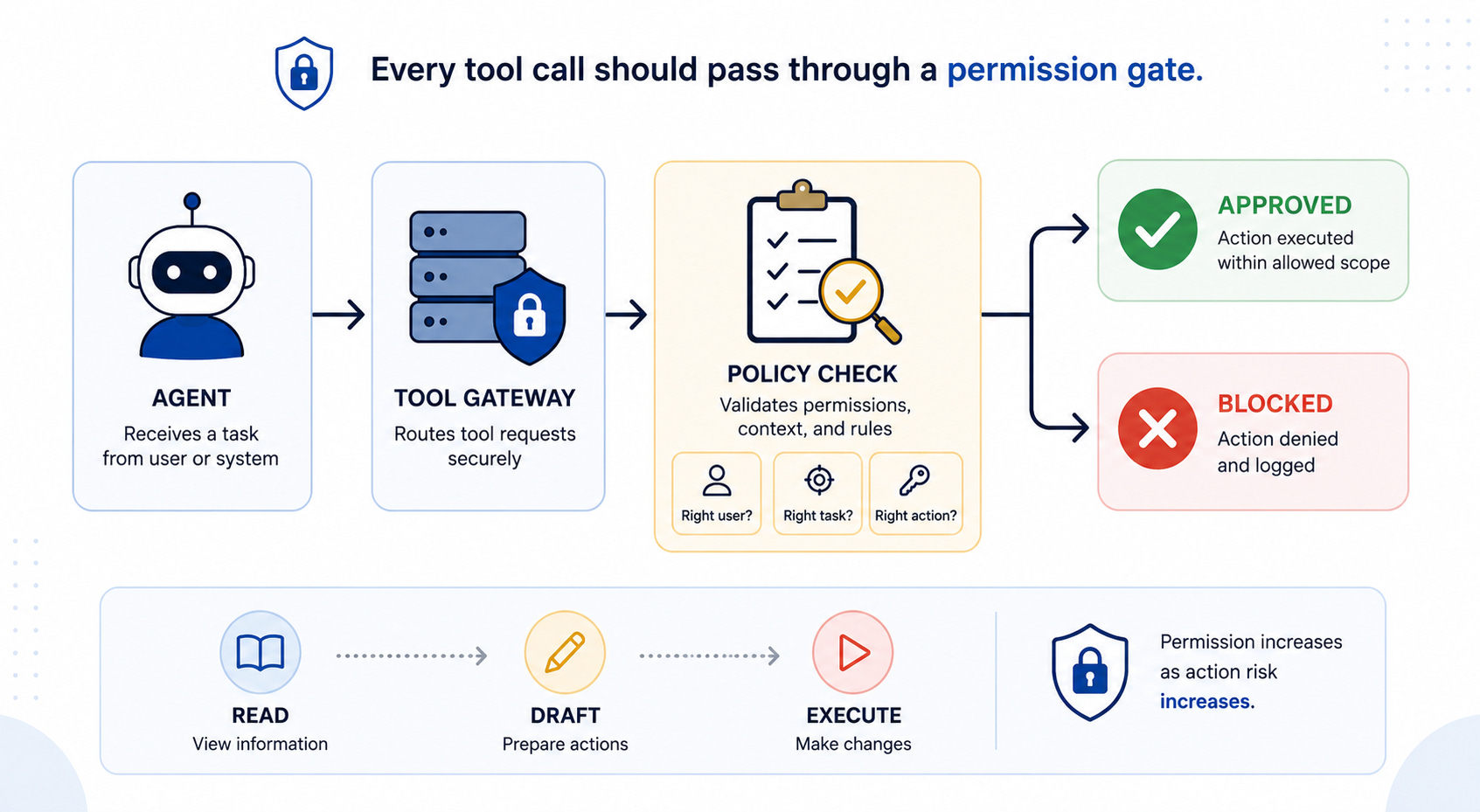
A simple way to think about agent tools is to separate them into three levels.
Read means the agent can inspect information.
It can search docs, retrieve records, read logs, or check status.
Draft means the agent can prepare an action, but not perform it.
It can write an email draft, prepare a refund request, create a proposed ticket update, or generate a change plan.
Execute means the agent can change the world.
It can send the email, issue the refund, update the record, restart the service, merge the pull request, or trigger the workflow.
Most production agents should move through these levels slowly.
Read access is not harmless, but it is usually the safest place to start.
Draft access is powerful because it improves productivity while preserving human control.
Execute access is where the risk changes.
Once an agent can execute, prompts are no longer enough.
You need policy checks, approval gates, rate limits, audit logs, rollback paths, and circuit breakers.
Autonomy without permission boundaries is not intelligence.
It is uncontrolled delegation.
The principle of least agency
Security teams already know the principle of least privilege:
Give a system only the access it needs to perform its job.
Agentic systems need a similar rule:
Give an agent only the agency it needs to resolve the task safely.
I call this the principle of least agency.
It is not enough to ask what data the agent can access.
You also have to ask:
What can it decide?
What can it change?
What can it trigger?
What can it send?
What can it remember?
What can it delegate?
What can it do without approval?
An agent with too much agency may still pass demos.
It may even pass basic evals.
But production is where edge cases appear: angry users, ambiguous policies, stale context, conflicting instructions, tool failures, and unexpected combinations of permissions.
That is where overpowered agents become dangerous.
Tool access should be scoped at runtime
One common mistake is giving the agent a static list of tools.
The agent always has access to everything in its toolbox.
That is convenient.
It is also risky.
Tool access should be scoped dynamically based on the task, user, role, data sensitivity, autonomy level, and current risk state.
A billing explanation task may allow invoice read access.
A refund request may allow refund drafting.
A refund execution may require approval.
A high-value refund may require manager review.
A suspicious request may block all write actions.
A policy conflict may trip the circuit breaker.
The tool list should not be a menu.
It should be a permission envelope.
The agent should only see the tools it is allowed to use in that specific context.
That reduces risk and improves reasoning.
Agents behave better when the architecture removes unsafe options instead of relying on the model to ignore them.
The audit question
Here is the question every team should ask before shipping an agent with tools:
If this agent takes the wrong action, can we explain who allowed it, why the tool was available, what policy checked it, and how to undo it?
If the answer is no, the agent is not production-ready.
Tool governance needs auditability.
For every tool call, you should know:
What tool was called?
By which agent?
For which user?
Under which policy?
With what input?
Using what permission scope?
What changed?
Was approval required?
Was the action reversible?
What was logged?
Without that trail, tool calling becomes a black box with production access.
That may be fine for a demo.
It is not fine for enterprise systems.
The real architecture pattern
The answer is not to remove tools from agents.
Tool use is what makes agents useful.
The answer is to put a governance layer between the agent and the tool.
The agent should not call production APIs directly.
It should go through a tool gateway that checks:
Is this agent allowed to call this tool?
Is this user allowed to request this action?
Is this task within scope?
Is the data permissioned correctly?
Is approval required?
Is the action reversible?
Has the agent exceeded retries, cost, or risk limits?
Should this be logged, blocked, approved, or escalated?
That gateway becomes the control point.
The prompt tells the model how to behave.
The gateway decides what the system allows.
That is the shift.
Final thought
AI agents do not become production-ready because they can call more tools.
They become production-ready when tool access is scoped, governed, audited, and reversible.
The future of agentic systems will not be “one agent with every tool.”
That is the God Model with API keys.
The better future is agents with narrow missions, limited agency, scoped tools, approval gates, observable actions, and clear stop conditions.
Tools are not plugins.
Tools are permissions.
And if your AI agent has more API access than the task requires, you do not have an intelligent assistant.
You have a permission leak waiting for the right prompt.
I like the permission-model framing. Tool calling sounds like capability, but in production it is closer to authority. Read, write, delete, message, spend and approve are different action classes, and the blast radius should be designed around those classes rather than around the model name.
Thanks for this. Timely for me and covered somethings I hadn’t thought of.