
Your AI Needs a ‘Panic Button’, Not a Better Prompt
You are building a 2026 AI backend with a 2012 CRUD frontend.

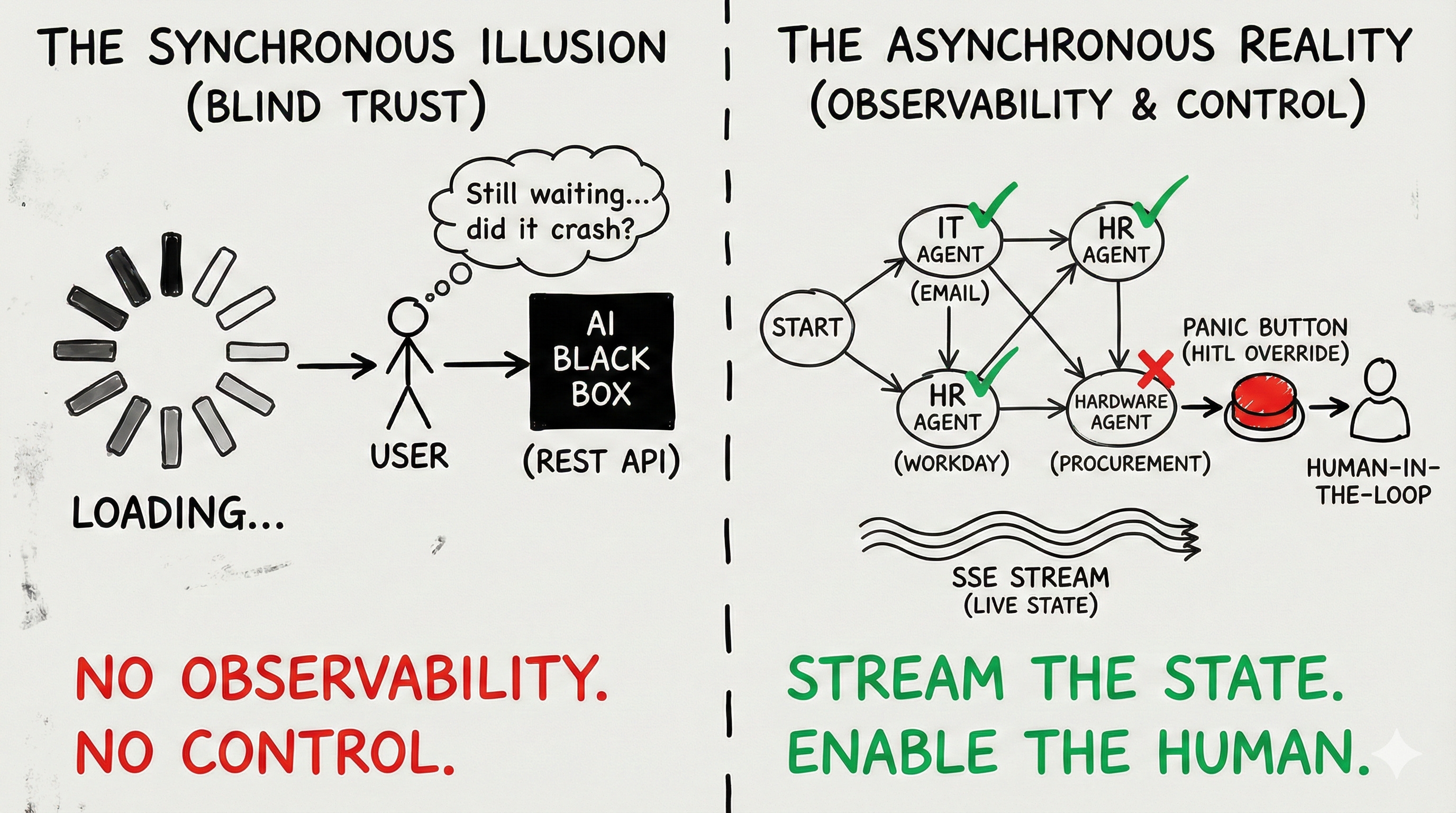
You have spent the last three months decoupling your LLMs. You implemented an event-driven architecture. You built a deterministic Orchestrator to manage your Saga patterns and handle complex, multi-agent workflows. Your backend is an asynchronous powerhouse.
And then, you slap a spinning loading wheel on the frontend and ask the user to wait.
This is an architectural failure.
When a user clicks “Submit” on a traditional web application, they expect a response in under 200 milliseconds. If it takes longer, the user assumes the application is broken.
But true Agentic AI is fundamentally slow. If your Orchestrator is coordinating a swarm of agents to research a vendor, evaluate procurement policies, and draft a purchase order, that process isn’t going to take 200 milliseconds. It might take 45 seconds. It might take two minutes.
If you freeze the user interface with a blocking REST call and a generic Loading... spinner for two minutes, three things will happen:
The user will lose trust in the system.
The user will hit refresh, effectively firing a duplicate 2-minute request at your infrastructure and causing a thundering herd.
The user will have zero context when the workflow inevitably encounters a partial failure.
We pretend autonomous AI is magic. We pretend it never needs help. But when an asynchronous workflow hits a Dead Letter Queue (DLQ), a loading spinner isn’t going to cut it.
Your AI doesn’t need a better system prompt to handle edge cases. Your architecture needs an Asynchronous Human-in-the-Loop (HITL) interface. It needs a Panic Button.
The Synchronous Illusion
To fix the UI, we first have to admit that the “Chatbot” paradigm is dead for enterprise workflows.
ChatGPT conditioned us to expect token streaming. We type a prompt, and the words appear one by one. This is fine for text generation. It is entirely useless for state mutation.
If a user asks your enterprise system to “Onboard a new employee and provision their hardware,” streaming back the words “I am working on that now...” provides zero actual system observability.
The user does not care about the LLM’s raw output. The user cares about the State of the Directed Acyclic Graph (DAG).
If your backend Orchestrator has broken the onboarding intent down into five distinct tasks, the UI must reflect those five tasks in real-time. It must visualize the invisible.
But because your backend is fully decoupled and running on a message broker like Kafka or RabbitMQ, the HTTP request that initiated the workflow has already been closed. Your frontend is disconnected. How do you push state updates to a disconnected client?
Pattern 1: Server-Sent Events (SSE) for State Streaming
When engineers realize they need to push real-time updates from a background worker to a frontend, their immediate instinct is to open a WebSocket.
Do not use WebSockets for AI observability. WebSockets are bi-directional, persistent connections. They are incredibly heavy, difficult to scale behind load balancers, and require complex heartbeat mechanisms to keep alive. Unless you are building a real-time multiplayer game, WebSockets are overkill.
Instead, you must use Server-Sent Events (SSE).
SSE is a unidirectional protocol operating over standard HTTP. The client opens a connection, and the server keeps that HTTP response open, streaming discrete JSON events down the wire as they occur in the message broker.
When your Orchestrator commands the IT Agent to provision an email, it emits an event to Kafka. A dedicated Notification Microservice consumes that event and pushes it down the SSE pipe to the frontend.
The UI reacts by turning the “IT Provisioning” node in the DAG visualizer from Pending (Gray) to In Progress (Blue). When the agent succeeds, it emits another event, and the UI node turns Complete (Green).
You have replaced the anxiety-inducing loading spinner with extreme, high-signal transparency. The user can literally watch the swarm execute its workflow step-by-step.
Pattern 2: The Asynchronous Human-in-the-Loop (HITL)
Transparency is great when things succeed. But as we established in our breakdown of the Saga Pattern, distributed systems fail.
What happens when your workflow encounters a failure that it cannot automatically compensate for? What happens when the Orchestrator hits the limits of its retry logic and routes the task to a Dead Letter Queue?
In a monolithic CRUD app, you throw an HTTP 500 Error to the screen. In an asynchronous agentic swarm, you must transition the UI into a Human-in-the-Loop (HITL) Override State.
This is the “Panic Button.”
Let’s use our procurement example. The swarm is trying to order a laptop. The Hardware Agent calls the vendor API, but the item is out of stock. The agent tries three alternative vendors. All out of stock. The Orchestrator pauses the DAG.
Through the SSE stream, the UI receives a specific HITL_REQUIRED event payload. The UI dynamically shifts from a “monitoring” view to an “intervention” view.
To build trust, this intervention screen must provide the human operator with three critical pieces of context:
The Fault Line: Exactly which node in the DAG failed? (e.g., Hardware_Procurement).
The Raw Evidence: What did the external system actually say? (e.g., Display the raw JSON response from the vendor API:
{"error": "SKU_UNAVAILABLE"}).The Deterministic Options: What can the user do about it?
Do not ask the user to type a new natural language prompt to fix the error. Natural language is ambiguous. When a system is in a failed state, you need determinism.
Present the user with hardcoded, deterministic action buttons:
[ Override: Skip Hardware Provisioning ][ Override: Select Alternative SKU Manually ][ Abort: Trigger Saga Reversion for Entire Workflow ]
When the user clicks one of these buttons, the frontend fires a standard HTTP POST request back to the API gateway (e.g., POST /workflows/{trace_id}/resume). The Orchestrator receives this human override, applies the deterministic choice, and resumes the asynchronous execution.
The Implementation Blueprint: The HITL Payload
To make this work, the data contract between your Orchestrator and your Frontend must be rigorous. Your AI should not be generating the UI code. Your AI generates the state, and your frontend maps that state to strict React/Vue components.
When the Orchestrator pauses for human intervention, it must push a payload that looks exactly like this:
JSON
{
  "event_type": "WORKFLOW_PAUSED_HITL",
  "trace_id": "req_8847_abc",
  "failed_agent": "hardware_procurement_bot",
  "failure_reason": "All approved vendors returned 404 for requested Macbook Pro SKU.",
  "context_snapshot": {
    "requested_budget": 2500,
    "user_department": "Engineering"
  },
  "available_resolutions": [
    {
      "action_id": "RES_SKIP",
      "display_text": "Skip Hardware Step",
      "requires_input": false
    },
    {
      "action_id": "RES_MANUAL_SKU",
      "display_text": "Provide Custom Vendor Link",
      "requires_input": true,
      "input_schema": "url"
    },
    {
      "action_id": "RES_ABORT_SAGA",
      "display_text": "Abort and Rollback Onboarding",
      "requires_input": false
    }
  ]
}
This payload gives the frontend everything it needs to render a secure, intuitive override screen without the AI ever having to know how the UI is built.
The “Tab Close” Problem: State Rehydration
There is one final UX nightmare you must architect for in asynchronous systems.
Because workflows take minutes, users will close their browser tabs. They will navigate away. They will lose their internet connection on their mobile device.
If your UI relies entirely on listening to the live SSE stream to build its visual state, closing the tab erases that state. When the user reopens the app five minutes later, the workflow is still running in the Kafka backend, but the UI has no idea what is happening.
You must implement State Rehydration.
The UI cannot be the source of truth for the workflow’s state. You must externalize the state into a fast data store, typically Redis or a dedicated PostgreSQL table representing the DAG execution graph.
Every time the Orchestrator emits an event, it doesn’t just push it to the SSE stream; it simultaneously updates the Redis cache for that specific trace_id.
When a user opens your application, the frontend must immediately make a synchronous call: GET /workflows/{trace_id}/state. It pulls the entire execution history from Redis, instantly rehydrates the DAG visualizer, paints the completed nodes green, and then opens the SSE connection to listen for the remaining live updates.
Conclusion: Trust is Control
We are obsessed with making AI seem “human.” We hide the complex execution graphs. We mask the API calls behind friendly, conversational text. We tell the user, “Don’t worry, I’ve got this.”
But in enterprise software, hiding complexity doesn’t build trust. It builds suspicion.
When a system is a black box, users hesitate to use it for anything that actually matters. They will use your agent to draft an email, but they will never let it touch their production database or company credit card because they don’t know what it will do, and they don’t know how to stop it if it goes rogue.
Trust is not built through better prompt engineering. Trust is built through observability and control.
If you want your users to trust your agentic swarm, show them the DAG. Stream the state. Give them a deterministic Panic Button.
Stop trying to build a magical chatbot. Start building an autonomous system that respects the human operator enough to ask for help.