
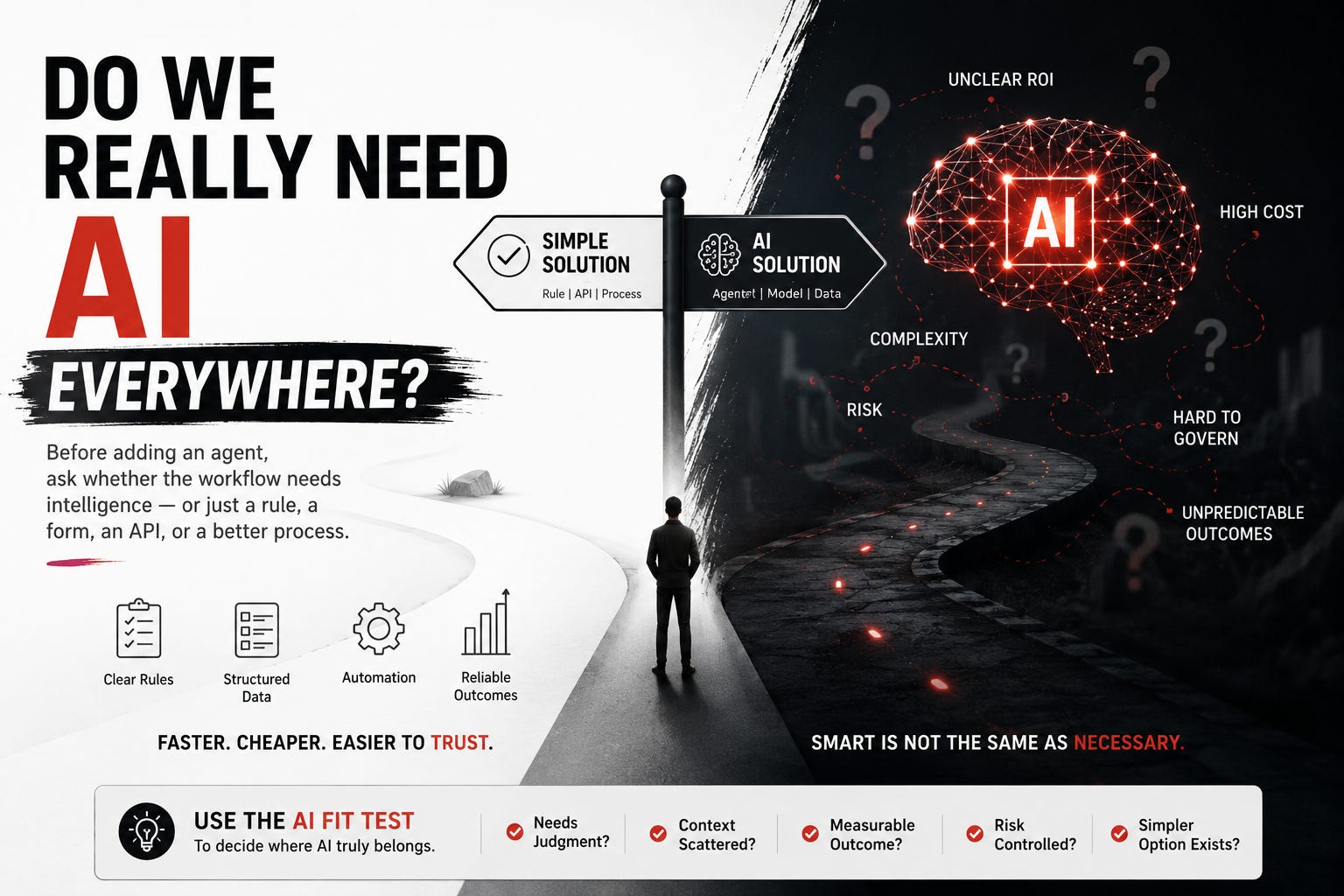
Do We Really Need AI Here?
Before adding an agent, ask whether the workflow needs intelligence — or just a rule, a form, an API, or a better process.

The most expensive AI projects do not fail because the model is weak.
They fail because the problem never needed AI in the first place.
A team sees a slow workflow. Someone suggests an AI agent. The demo looks good. The agent summarizes, drafts, classifies, routes, and explains. Everyone feels like progress is happening.
Then the real workflow pushes back.
The inputs are structured. The rules are stable. The decisions are simple. The exceptions are rare. The risk is higher than the reward. The business outcome is unclear.
At that point, AI is no longer solving the problem.
It is decorating it.
This is becoming one of the quiet mistakes in enterprise AI: teams are forcing AI into places where a rule, workflow, dashboard, approval step, database query, or better form would do the job faster, cheaper, and more reliably.
That does not mean AI agents are overhyped.
It means they are being misapplied.
The real skill now is not knowing how to add AI everywhere.
The real skill is knowing where AI belongs.
AI should not be the default answer
When a technology becomes exciting, teams start using it as the starting point.
“How can we use AI here?”
That question sounds innovative, but it can be dangerous. It assumes the solution before the problem is understood.
A better question is:
What is the actual bottleneck in this workflow?
Sometimes the bottleneck is missing context. AI may help.
Sometimes it is ambiguity. AI may help.
Sometimes it is judgment across messy information. AI may help.
But sometimes the bottleneck is much simpler.
The form has too many fields.
The approval chain is unclear.
The API is missing.
The data is not clean.
The dashboard is hard to read.
The process has no owner.
The rule should have been automated years ago.
In those cases, AI can make the workflow look smarter while the underlying problem remains untouched.
That is how teams end up with agents summarizing chaos instead of fixing it.
The wrong places to force AI
There are some workflows where AI is usually the wrong first move.
If the task is deterministic, use rules.
If the same input should always produce the same output, AI is often unnecessary. Tax category mapping, status transitions, required-field validation, access checks, routing based on known rules — these are better handled by deterministic logic.
If the data is already structured, use software.
A lot of “AI use cases” are really reporting or workflow-product problems. If the answer already exists in a database and the user only needs a clean view, build the view. Do not wrap the database in a probabilistic assistant unless the user also needs interpretation.
If the process is broken, fix the process.
An agent cannot rescue a workflow where nobody owns the decision, policies conflict, handoffs are unclear, and success is not defined. It may move work faster, but it will also move confusion faster.
If the risk is high and the value is low, do not add autonomy.
There is no reason to put an AI agent in the middle of a low-value task where one wrong action can create customer, legal, financial, or operational damage.
If users do not trust the output, solve trust before automation.
Some teams add AI to speed up work that humans will re-check from scratch anyway. That is not automation. That is a second source of work.
Where AI actually earns its place
AI becomes more useful when the workflow has messy inputs, scattered context, judgment, and language-heavy work.
A support ticket with missing context.
An incident alert that needs logs, metrics, deploy history, and ownership.
An RFP question that needs sourced answers from many documents.
A compliance evidence request that requires matching controls to artifacts.
A sales follow-up that must combine transcript, CRM state, product constraints, and next steps.
A customer onboarding risk that depends on dependencies across teams.
These are better AI candidates because the work is not just “execute a rule.”
The work requires interpretation.
The agent has to gather context, compare evidence, identify gaps, draft a recommendation, and help a human decide.
That is where AI can reduce cognitive load.
Not by being magical.
By making messy work easier to reason through.
The AI Fit Test
Before building an AI feature or agent, I would run a simple fit test.
First, ask whether the task needs judgment. If the answer is always the same for the same input, start with rules or automation.
Second, ask whether the context is scattered. If the work requires pulling information from documents, systems, tickets, messages, history, and policies, AI may be useful.
Third, ask whether the input is messy. Natural language, incomplete requests, conflicting information, screenshots, transcripts, logs, and long documents are good signs.
Fourth, ask whether the outcome is measurable. If you cannot define what gets better, the AI project will drift into demo territory.
Fifth, ask whether the risk is controllable. If one wrong action can move money, change permissions, break production, or expose sensitive data, the first version should probably draft or recommend — not execute.
Sixth, ask whether a simpler solution would work. This is the uncomfortable one. Could a form, rule, dashboard, search improvement, API, or process change solve 80% of the pain?
If yes, start there.
AI should earn its place in the architecture.
A good AI consultant should sometimes say “don’t use AI”
This is where AI consultants can build real trust.
A weak consultant tries to fit AI into every problem because AI is what the client asked for.
A strong consultant diagnoses the workflow first.
Sometimes the answer is an agent.
Sometimes it is a rules engine.
Sometimes it is a better escalation policy.
Sometimes it is cleaning the knowledge base.
Sometimes it is defining ownership.
Sometimes it is building a simple internal tool.
That honesty matters.
Because clients do not actually want AI.
They want faster resolution, lower cost, better decisions, fewer errors, shorter cycle times, cleaner handoffs, and more reliable operations.
AI is one possible mechanism.
It is not the goal.
The best AI work often starts with a sentence that sounds almost anti-AI:
“Before we add an agent, let’s prove this workflow actually needs one.”
That is not skepticism.
That is architecture.
The real problem with “AI everywhere”
The danger of AI everywhere is not only cost.
It is complexity.
Every AI component adds new questions.
What data can it access?
What happens when it is wrong?
Who approves its actions?
How do we evaluate it?
How do we trace it?
How do users challenge it?
What does it remember?
What does it forget?
What happens when the model changes?
If the workflow did not need AI, all of that complexity becomes waste.
The organization now has a smarter-looking system that is harder to test, harder to govern, harder to debug, and harder to trust.
That is a bad trade.
AI should simplify the user’s work, not complicate the operator’s system without a clear return.
Start with the workflow, not the model
The right sequence is simple.
Define the workflow.
Find the bottleneck.
Name the decision.
Identify the context.
Measure the outcome.
Check the risk.
Then decide whether AI belongs.
If AI fits, use it deliberately.
Use it where language, judgment, context, and ambiguity make traditional automation weak.
Do not use it where rules, forms, APIs, dashboards, or process redesign would be better.
The future is not AI in everything.
The future is AI in the right places.
That is how we move from hype to useful systems.
Where do you see AI being forced today: support, sales, HR, finance, DevOps, compliance, or internal productivity tools?
Some AI projects are basically a very expensive way to avoid fixing the form.
Everyone gets a clever demo, the agent gets a name, and three weeks later the real bottleneck is still “who’s meant to approve this thing?”
I've noticed teams often treat AI as the project instead of another design choice. I sometimes wonder if that's because adding a model feels easier than changing the process.
Redesigning a workflow that crosses three departments is usually much harder than adding another layer of technology.